
What happens without controlled SharePoint provisioning?
Without clear rules for provisioning, SharePoint can quickly become cluttered with confusing structures:
- Unstructured, duplicate, or incomplete sites
- Inefficient processes
- Unclear permissions
- High costs for IT departments
- Lack of Microsoft 365 governance
- Risks for your Microsoft 365 security
With SharePoint provisioning, you can avoid these risks by providing structured and standardized processes for creating new sites from the start.
This article is intended for IT administrators, governance responsibles, and Microsoft 365 administrators who want to know what options are available for provisioning in SharePoint, what limitations each method has, and when a tool such as Teams Manager is worthwhile.
Teams Manager is a Microsoft Teams app that simplifies the provisioning of SharePoint sites, M365 groups and teams. With features such as approval workflows, naming conventions and metadata, Teams Manager ensures structured and secure provisioning.

What is SharePoint provisioning?
SharePoint provisioning is the process of creating new SharePoint sites based on predefined templates and rules.
This includes:
- Uniform templates for sites, lists, libraries, metadata, and permissions
- Defined approval processes
- Standardized permissions and structures
- Automated lifecycle rules
The goal is for every new SharePoint site to follow the same governance concept.
What methods are available for SharePoint provisioning?
Microsoft offers several ways to create and manage SharePoint sites. They differ in terms of functionality, effort, and governance options.
The most common approaches are:
- Out-of-the-box (OOB): The standard method directly in SharePoint
- PnP Provisioning Engine: Code-based templates via PowerShell or CLI
- Power Automate: Automation via workflows
- Third-party tools such as Teams Manager, which combine governance and automation
When is the out-of-the-box (OOTB) method sufficient?
With the out-of-the-box tools, you can create and configure basic SharePoint pages. These tools are ideal for simple scenarios and include features such as:
- Use of templates: Communication Sites or Team Sites with standard layouts
- Standard templates for lists and libraries: Document libraries, task lists or calendars
- User and permission control: Standard permissions for security groups
Advantages:
- Directly available and easy to use
- No technical knowledge required
Disadvantages:
- Templates only offer limited customization options
- No automation of recurring tasks
- No functions such as lifecycle management, naming conventions or metadata management
For companies with many sites, OOB alone is too inflexible to ensure governance.
How does PnP provisioning work?
The PnP (Patterns and Practices) Engine is an open source solution from Microsoft that offers extensive configuration options via PowerShell. The PnP Provisioning Engine enables:
- Creation and use of templates: Lists, libraries, metadata and more
- Exporting and importing configurations: Export, customize and apply templates
- Integration of content: Documents, folder structures or user-defined web parts
Advantages:
- High flexibility and scalability
- Ideal for complex scenarios and individual customizations
- Recurring tasks can be automated
Disadvantages:
- Technical knowledge required (PowerShell, JSON)
- No graphical user interface, management exclusively via scripts
- Automation and governance only possible to a limited extent and in combination with additional solutions (e.g. Power Automate, Flow)
- Managing and updating scripts is time-consuming and error-prone
PnP is ideal for companies with internal developers or administrators who want to control provisioning via scripts.
How can provisioning be automated with Power Automate?
Power Automate offers a user-friendly solution for integrating workflows into the provisioning process. It enables:
- Approval workflows: Approval by defined individuals
- Notifications and reminders: Automatic mails or Teams notifications within SharePoint
- Integration with other Microsoft services: Workflows with PowerApps, Forms, Planner or other tools
Advantages:
- Easy to use
- Power Automate can be seamlessly integrated with other Microsoft services
Disadvantages:
- Limited functionality for complex requirements
- Limited governance functions, require additional configurations or tools
- Lack of template management, manual effort for customizations
Power Automate is suitable for individual, clearly defined use cases, but not for large-scale governance processes.
What advantages do third-party tools such as Teams Manager offer for SharePoint provisioning?
Third-party tools such as Teams Manager combine provisioning, governance, and automation in a single interface.
Features:
- Template management: Creation, management and application of templates with central management and synchronization
- Automated approval workflows: Review and approval of requests with automated workflows
- Advanced governance integration: Naming conventions, lifecycle management or metadata management
Advantages over native methods:
- No PowerShell or manual maintenance required
- User-friendly for end users and IT administrators alike
- Automated workflows minimize manual effort
- Comprehensive governance through integrated features for naming conventions, metadata management, and lifecycles
Ideal for companies that want to standardize provisioning while automating governance.

Challenges of classic SharePoint provisioning methods
The classic methods (OOTB, PnP Provisioning Engine and Power Automate) for SharePoint provisioning often have weaknesses that affect efficiency and security:
- High manual workload: Many manual steps that are time-consuming and prone to errors
- Technical barriers: Tools such as PnP or PowerShell require technical expertise in areas such as PowerShell or JSON
- Lack of template management: No central management of templates and inconsistencies
- Limited governance functions: Guidelines such as naming conventions or lifecycle management are not available or only available to a limited extent
- Difficult scalability: Limitations wirth new or more complex requirements, additional tools or scripts required
Due to these challenges, in many cases it is advisable to use a third-party tool that provides a comprehensive combination of provisioning, automation and governance. Teams Manager offers a user-friendly and integrated solution for this.
Why Teams Manager for provisioning SharePoint websites?
Teams Manager combines the benefits of automated SharePoint provisioning with comprehensive governance features. Teams Manager not only improves provisioning, but also optimizes SharePoint collaboration by creating structured, secure and efficient work environments.
Features and benefits of Teams Manager:
- Request and approval workflows: Automated or manual approval of requests by administrator
- Centralized template management: Ready-to-use SharePoint site templates with structure, permissions, and content
- Comprehensive governance features: Naming conventions, lifecycle management, and metadata
- Ease of use: Easy to use, no technical expertise required
- Easy automation: Fully automated provisioning processes
How does SharePoint provisioning work with Teams Manager?
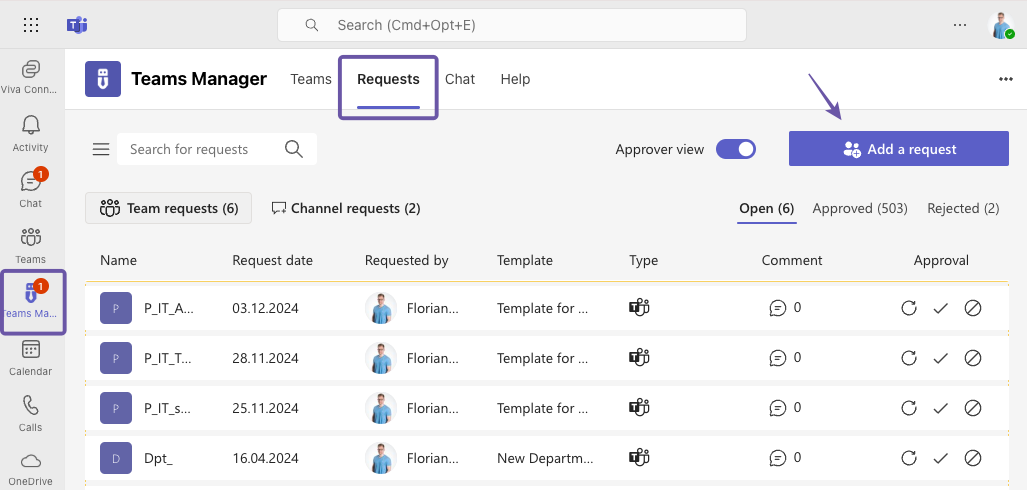
- Go to the „Requests“ tab in Teams Mangager and click on „Add a request“.
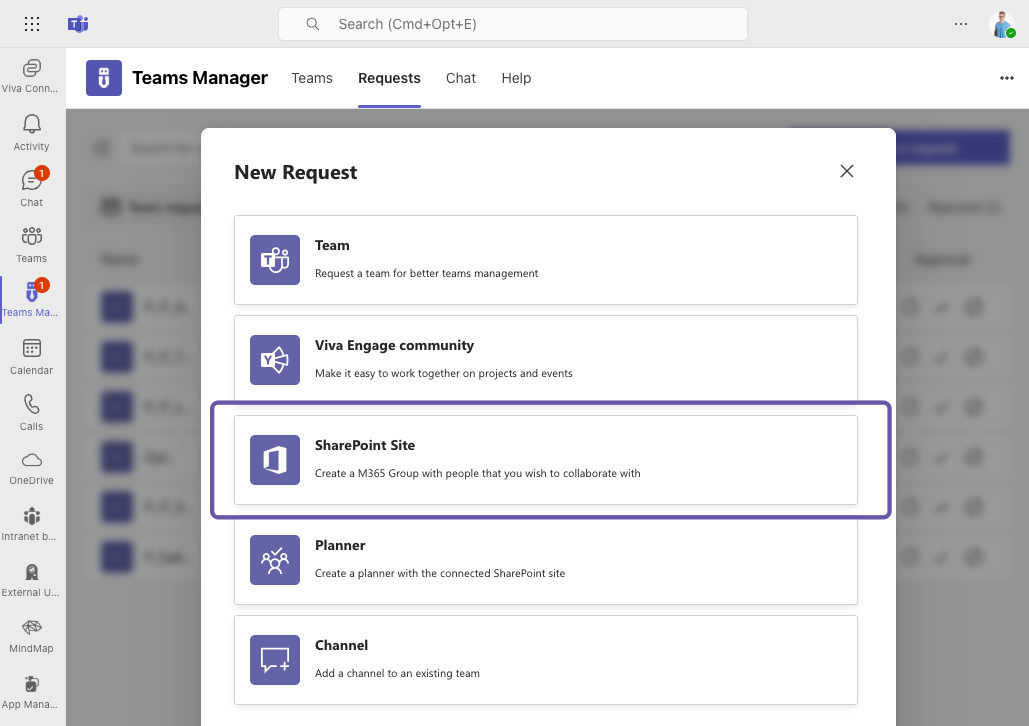
- Select „SharePoint Site“.
- Select the desired pre-configured template
- Enter the required information: name, description, visibility, comment.
- Configure the access settings: guest access, owners, members.
- Click on „Send request“.
- Once the request has been approved, the SharePoint site is created based on the template and the governance policies and is immediately ready for use.
Which SharePoint provisioning method suits your use case?
| Method           | Advantages                                 | Limitations                              |
| ---------------- | ------------------------------------------ | ---------------------------------------- |
| Out-of-the-box   | fast, easy                                 | no governance, no lifecycle              |
| PnP Provisioning | flexible, repeatable                       | technically complex, no visual interface |
| Power Automate   | visual, combinable with Microsoft services | no templates, no governance focus        |
| Teams Manager    | governance, automation, templates          | license costs, third-party dependency    |
The choice depends on the size and complexity of your environment. For productive governance scenarios, tool-based provisioning is the most efficient way.
SharePoint provisioning with governance as a requirement
Structured provisioning saves time, keeps things organized, and meets compliance requirements.
While native methods (OOTB, PnP, Power Automate) provide a solid foundation, tools such as Teams Manager bring real governance, automation, and user-friendliness to everyday work.
Book a free demo now and see SharePoint provisioning with Teams Manager live.