Product Updates

VoicePilot: self-hosted dictation for Microsoft 365

Share on LinkedInShare on XShare on Microsoft TeamsShare via email
VoicePilot dictation running inside a company's own Microsoft 365 environment

Your team already uses dictation. Into Wispr Flow, into the microphone in ChatGPT, into whatever other tool they installed. Client calls, HR notes, and internal drafts end up in third-party clouds outside the EU. Nobody approved it, and nobody can audit it.

EU-hosted is not the same as your own tenant

Most voice tools that advertise EU processing still run in their own cloud, not in yours. Your recordings sit in a vendor's environment, under a vendor's policy. That is a different thing from your own tenant.

|  | **Typical voice tool** | **VoicePilot** |
| --- | --- | --- |
| Where voice data is processed | The vendor's cloud | Your own Azure tenant |
| Who holds the keys | The vendor | You, with no third-party API keys |
| Audit trail | The vendor's dashboard, if there is one | Audit logs in your Admin Center |

A voice OS, not just a dictation app

VoicePilot is a self-hosted voice operating system for Microsoft 365 that runs inside your own Azure environment. You can speak into any app and VoicePilot transcribes, formats, and posts the text for you.
VoicePilot logo

Speaking is about 5x faster than typing. That saves roughly 80 % of your time and around 36 € per hour of writing (at an average cost of 45 € an hour).

Available today:

  • Voice to Text: dictate into any app on Windows or macOS.
  • Style engine: context-aware formatting per app, so a Teams message does not read like a contract and a business e-mail can sound more formal.
  • Dictionary / glossary: one central term list for everyone, names and product terms included.

On the roadmap and coming soon:

  • Commander for voice commands that control your computer and apps
  • Prompt optimization when talking to AI apps
  • M365 actions – e.g. create a Planner task or send a Teams message by voice
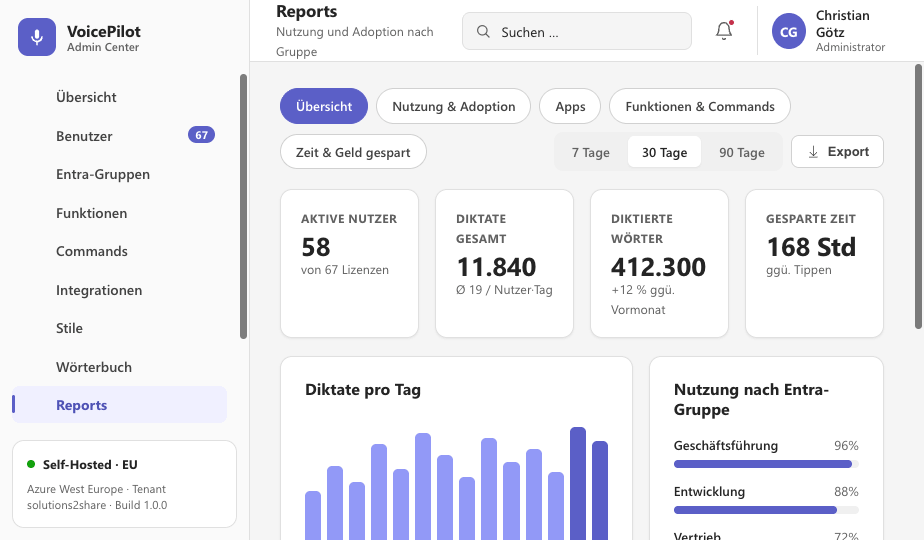
Report about your team’s usage of the dictation app VoicePilot

Why Solutions2Share

We have built Microsoft 365 apps for 15 years and are ISO 27001 and Microsoft 365 certified. Teams Manager and External User Manager are powerful governance apps for Microsoft 365, run in companies that need control over who creates teams and who gets guest access. VoicePilot follows the same rules: Self-hosted in Azure, no third-party API keys, audit logs in the Admin Center, built in Germany.

Start with a free trial

Download the app on www.voicepilot.eu and try it free on Windows or macOS. You’ll be amazed to see how much time you save with a week of dictation.

Start your free trial today!

Solutions2Share

FAQ: VoicePilot and voice data in Microsoft 365

What is VoicePilot?

VoicePilot is a self-hosted voice operating system for Microsoft 365 from Solutions2Share. It lets you dictate into any app, and it runs inside your own Azure tenant, so voice data stays in your environment.

Where is our voice data processed?

In the self-hosted edition, in your own Azure tenant. There is also a SaaS edition operated in the EU if you would rather not host it yourself.

Is the Microsoft 365 dictation function not enough for business?

Microsoft 365 dictation covers basic transcription. It does not give you voice data held in your own tenant, audit logs for that data, formatting that adapts to the app you are writing in, an admin area to manage your team, statistics on your dictation data etc.

Which features are available today?

Voice to Text, the context-aware style engine, and the central dictionary. Commander, prompt optimization, and M365 Actions are on the roadmap.

What does VoicePilot cost?

Volume pricing depends on package size, starting at 4.90 € per user per month as of September 2026. For more details, visit the website at voicepilot.eu.

How do we try it?

Download the app for Windows or macOS and start the free trial. For a team trial, roll it out from the admin portal at admin.voicepilot.eu.

Can I dictate to Copilot with VoicePilot?

Yes. In the Copilot app, tap the microphone and speak your prompt. Copilot Voice lets you have a spoken conversation. On Windows, voice typing with Windows key + H also works in the Copilot prompt box. VoicePilot works in any app, Copilot included, and keeps voice data in your own Azure tenant.

How do I dictate in Word?

In Word for Microsoft 365, go to Home, select Dictate, and start speaking. Without a Microsoft 365 subscription, use Windows voice typing with Windows key + H. Both cover basic transcription. VoicePilot adds formatting that adapts to the app and one shared glossary for names and product terms.

How do I dictate in Outlook?

Open a new email and select Dictate on the Message tab, or press Windows key + H. Use VoicePilot's style engine to write a business email in a more formal style than e.g. a Teams message. That means less fixing after you've dictated.

How does dictation work in Windows 11?

Press Windows key + H to start voice typing in any text field. On Copilot+ PCs, fluid dictation also fixes grammar, punctuation, and filler words on the device. Microsoft currently offers it in English only. VoicePilot runs on any Windows or macOS device, regardless of hardware, and supports multiple languages.

What is AI dictation?

AI dictation turns speech into finished text instead of a raw transcript. It removes filler words, adds punctuation, and formats the result for the app you're writing in. Before rolling it out company-wide, check where the audio is processed. With VoicePilot, that happens in your own Azure tenant, with no third-party API keys.

What should I look for in dictation software for business?

Start with where voice data is processed and who holds the keys. Then check for audit logs, central admin, and a shared glossary. When client calls and HR notes run through the tool, accuracy alone isn't enough. VoicePilot runs self-hosted in your Azure tenant, with audit logs in your Admin Center.

Is there a Wispr Flow alternative that runs in my own tenant?

Yes. VoicePilot is a dictation app for Windows and macOS that runs self-hosted in your own Azure tenant. Voice data stays in your environment, and admins get audit logs in the Admin Center. If you'd rather not host it yourself, there's a SaaS edition operated in the EU.

Portrait of Christian Groß, founder and CEO of Solutions2Share
Written by
Christian Groß
CEO

Christian Groß is the founder and CEO of Solutions2Share and a recognized expert in Microsoft 365 and Microsoft Teams governance. With more than 15 years of experience building provisioning and governance software for Teams and Office 365, he has developed six Microsoft Teams applications, including Teams Manager, that help IT teams keep large Microsoft 365 environments structured and under control. He founded the German-speaking Microsoft 365 conference in Mainz and regularly speaks at international M365 events, where he helps IT leaders design scalable, practical governance strategies.

Connect on LinkedIn
Take the next step

Book a free demo