
A guest owner can add people to your Microsoft Teams workspace, remove them, or delete it outright. This read-only PowerShell check lists every guest in an owner seat.
Microsoft's capability table for Teams is blunt about guests. They can chat, share files, and join channels. The one row that stays empty is "Become team owner."
Ask the directory instead and the answer changes. A Microsoft 365 group's owner list holds user references, and nothing in it checks which tenant the user came from. So a guest can hold the owner seat of the group that a team is built on.
You let partners into your tenant deliberately, and that was the right call. LCO-0010 asks a narrower question: in how many of your workspaces is the accountable person somebody another company can reassign tomorrow?
What "a guest who owns the workspace" actually means
Owning a Microsoft 365 group is a set of concrete powers. Group owners add and remove members, approve guest invitations, rename the workspace, switch it between Public and Private, appoint and remove other owners, and can delete the group along with its SharePoint site, its group mailbox, and its Planner plans.
A guest is an account whose home is another directory. Your tenant holds a pointer; their employer holds the person. Their role changes when that company decides it changes. Their offboarding runs when that company runs it. Your joiner-mover-leaver process never fires for them, and your access reviews mostly look past them.
So the accountable party for a workspace can be someone none of your internal processes track. That isn't automatically wrong. A joint venture where the partner runs day-to-day membership is a legitimate design, chosen deliberately. The catalog treats guest ownership as an exception that needs a documented decision, not as a fire.
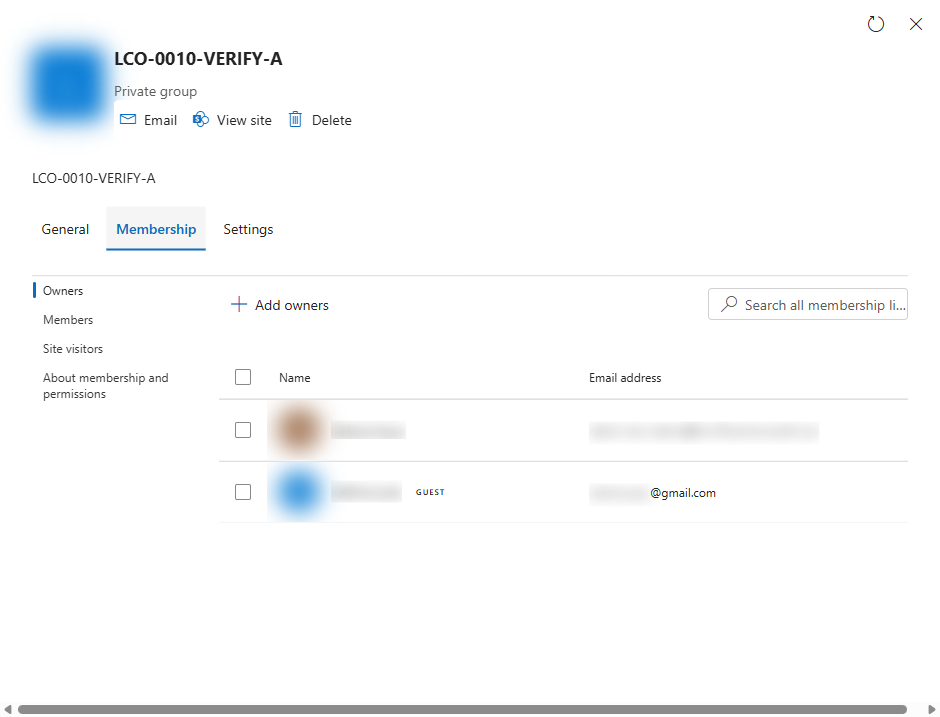
What makes it worth a script is that nothing surfaces it for you. The assignment happens at the directory layer: the Microsoft 365 admin center, Entra, PowerShell, or a provisioning tool. Afterwards the workspace behaves normally for everyone in it. The Owners list under a group's Membership tab does show the guest's email address, so the evidence is technically on screen, but nobody audits owner domains one workspace at a time.
Three routes into the owner seat, none of them mistakes
A finding like this sounds like somebody broke a rule. Each route below was defensible the day it was taken, and none of them has an expiry date.
- The partner who runs the project. A shared delivery workspace with an agency: their team changes monthly, yours doesn't. Routing every one of their staff changes through your service desk is friction nobody wants, so someone gives the partner lead the owner role and the tickets stop. Then the engagement renews twice, the partner lead hands their book to a colleague, and the ownership outlives everyone who remembers deciding it.
- The employee who became external. Entra ID lets you convert an account's
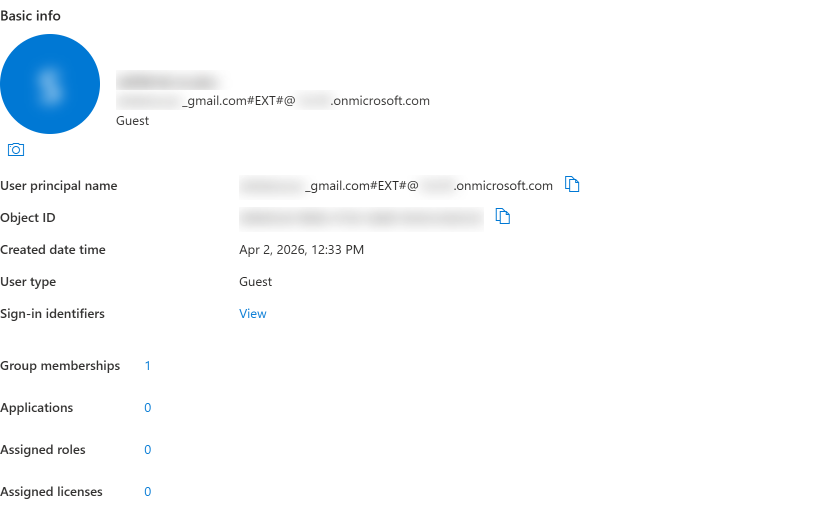
userTypefrom Member to Guest, and Microsoft documents that as the right move when a person's relationship to the company changes: an employee becomes a contractor, a subsidiary is sold, a merger unwinds. The conversion changes the account's category and touches nothing the account owns. Every workspace they owned as an employee, they still own as a guest. No review asks whether that should have survived, because the change itself was done by the book.
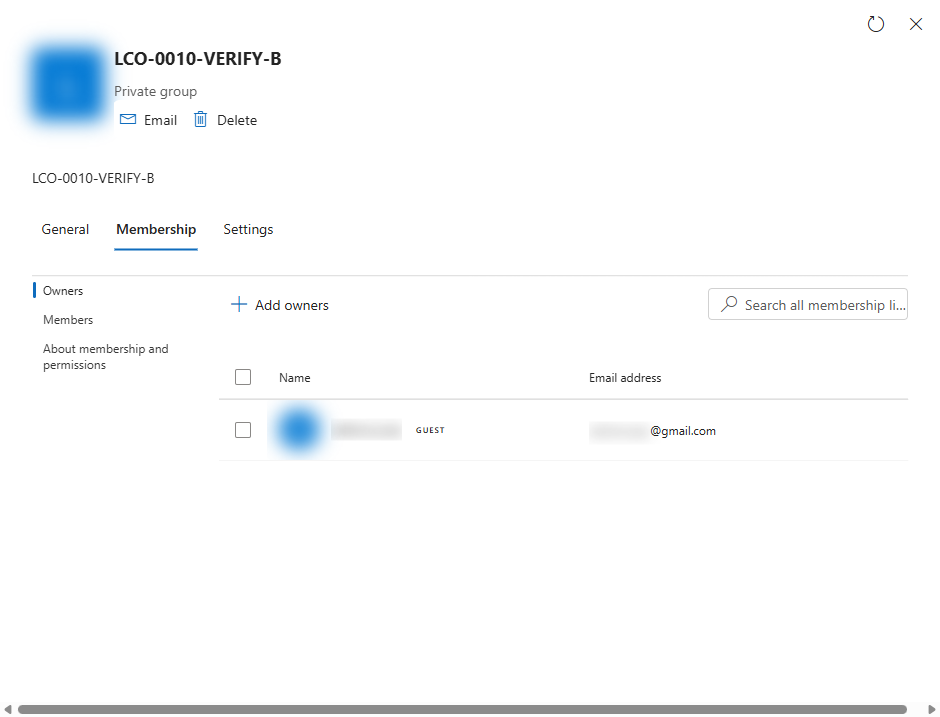
- The offboarding that removed the wrong half. A workspace has two owners, one internal and one guest, which is exactly the redundancy Microsoft's guidance asks for. The internal owner resigns, offboarding deletes their account, and deleting an account is not removing an owner, so no guard fires. What remains is the worst variant of this finding: a workspace whose only owner works for somebody else. Graph then refuses to remove that last owner, so your own admins can only reclaim the workspace by adding an owner first.
Check it yourself
Permissions, and why the second scope is load-bearing
One read-only permission set: GroupMember.Read.All, User.Read.All
One module from the Microsoft Graph PowerShell SDK: Microsoft.Graph.Authentication. Every call goes through Invoke-MgGraphRequest rather than the per-workload cmdlets, so there's nothing else to install. Both scopes need admin consent the first time someone in your tenant uses them. The second one matters more than it looks. GroupMember.Read.All returns the owner list on its own, but without User.Read.All Graph blanks the user properties, so every owner's userType comes back empty and nobody looks like a guest. A run missing that scope would report a clean tenant it never actually inspected, which is why the script refuses to stay quiet about it. It reads groups and owner properties, and changes nothing.
The script that finds guest owners
#Requires -Version 7.0
#Requires -Modules Microsoft.Graph.Authentication
<#
.SYNOPSIS
    Lists the Microsoft 365 groups (including Teams) that have a guest account among
    their owners, with the number of internal owners beside each one so you can see
    who inside the company can still act.

.DESCRIPTION
    LCO-0010 in the Governance Autopilot catalog.

    Read-only. Every call is a GET, with one exception: owner lists are read through
    the /$batch endpoint, which is reached by POST but carries nothing except GET
    requests. No New-, Set-, Update- or Remove- cmdlet appears anywhere in this file.

    Only Microsoft.Graph.Authentication is needed, because every call goes through
    Invoke-MgGraphRequest rather than the per-workload cmdlets.

    What it does:
      1. Signs in and reports which account and tenant answered
      2. Pages through every Microsoft 365 group, reporting progress per page. Graph
         has no server-side filter for "an owner is a guest" (owners is a navigation
         property), so every group's owner list has to be read.
      3. Reads owner lists with JSON batching, 20 requests per round trip, honouring
         Retry-After on 429 and 503
      4. Writes every row to CSV and prints the workspaces with the fewest internal
         owners first

    Scale note: reading owner lists one call at a time takes about an hour on a tenant
    with 10,000 groups. Batching brings it down to minutes, which is why this script is
    longer than a first pass would be.

.PARAMETER TenantId
    Optional. Pass it when your account can reach more than one tenant.

.PARAMETER OutputCsv
    Destination CSV. Defaults to guest-owned-m365-groups_<timestamp>.csv in the current directory.

.PARAMETER BatchSize
    Requests per batch call. Microsoft Graph allows a maximum of 20.

.PARAMETER TopConsole
    How many rows, fewest internal owners first, to print on screen. The CSV holds all of them.

.PARAMETER MaxRetries
    Retries per group on throttling or server errors. After that the group is reported with
    its error text in the Error column rather than silently dropped.

.EXAMPLE
    .\check.ps1 -Verbose

.NOTES
    If you have consented a different set of scopes to the Microsoft Graph PowerShell
    application before, you may need to run Disconnect-MgGraph and start again: a cached
    token gets reused and will not carry a newly added scope.
#>

# Read-only. Scopes: GroupMember.Read.All, User.Read.All

[CmdletBinding()]
param(
    [string]$TenantId,
    [string]$OutputCsv = (Join-Path (Get-Location).Path ('guest-owned-m365-groups_{0:yyyyMMdd-HHmm}.csv' -f (Get-Date))),
    [ValidateRange(1, 20)]
    [int]$BatchSize    = 20,
    [int]$TopConsole   = 25,
    [ValidateRange(0, 20)]
    [int]$MaxRetries   = 5
)

$ErrorActionPreference = 'Stop'
$GraphBase = 'https://graph.microsoft.com/v1.0'
$Eventual  = @{ ConsistencyLevel = 'eventual' }   # required for the $count annotation below

# --------------------------------------------------------------------- connect

$connect = @{ Scopes = @('GroupMember.Read.All', 'User.Read.All'); NoWelcome = $true }
if ($TenantId) { $connect['TenantId'] = $TenantId }
Connect-MgGraph @connect

$ctx = Get-MgContext
if (-not $ctx) { throw 'No Graph connection: Connect-MgGraph failed.' }

# Say out loud which tenant answered. Everything here is read-only, but running a
# governance check against the wrong tenant still wastes an afternoon.
if ($ctx.AuthType -eq 'AppOnly') {
    Write-Host ("Connected as app '{0}' in tenant {1}" -f $ctx.AppName, $ctx.TenantId) -ForegroundColor Green
}
else {
    Write-Host ("Connected as {0} in tenant {1}" -f $ctx.Account, $ctx.TenantId) -ForegroundColor Green
}
Write-Verbose ("AuthType: {0} | Scopes: {1}" -f $ctx.AuthType, ($ctx.Scopes -join ', '))

# ---------------------------------------------------- every Microsoft 365 group
# Unlike a check that can filter server-side, this one has to load every Microsoft 365
# group, because Graph offers no filter on an owner's userType. Paged by hand rather
# than with -All, so progress stays visible: on a large tenant a silent pager looks
# like a hung script and gets killed.

$groupFilter = "groupTypes/any(c:c eq 'Unified')"
$uri = '{0}/groups?$count=true&$top=999&$select=id,displayName,visibility,resourceProvisioningOptions&$filter={1}' -f
       $GraphBase, [uri]::EscapeDataString($groupFilter)

$groups     = [System.Collections.Generic.List[object]]::new()
$totalCount = $null
$page       = 0
$swLoad     = [System.Diagnostics.Stopwatch]::StartNew()

while ($uri) {
    $page++
    $resp = Invoke-MgGraphRequest -Method GET -Uri $uri -Headers $Eventual

    if ($null -eq $totalCount -and $null -ne $resp.'@odata.count') {
        $totalCount = [int]$resp.'@odata.count'
        Write-Host ("Microsoft 365 groups in the tenant: {0}" -f $totalCount) -ForegroundColor Cyan
    }

    # Invoke-MgGraphRequest hands back hashtables with camelCase keys. Normalise once
    # here so nothing downstream depends on how the data arrived.
    foreach ($g in $resp.value) {
        $groups.Add([PSCustomObject]@{
            Id                          = [string]$g.id
            DisplayName                 = [string]$g.displayName
            Visibility                  = [string]$g.visibility
            ResourceProvisioningOptions = @($g.resourceProvisioningOptions)
        })
    }

    if ($totalCount -gt 0) {
        Write-Progress -Id 1 -Activity 'Loading Microsoft 365 groups' `
            -Status ("Page {0}, loaded {1} of {2}" -f $page, $groups.Count, $totalCount) `
            -PercentComplete ([Math]::Min($groups.Count / $totalCount * 100, 100))
    }

    $uri = $resp.'@odata.nextLink'
}
Write-Progress -Id 1 -Activity 'Loading Microsoft 365 groups' -Completed
Write-Host ("Loaded {0} group(s) in {1:hh\:mm\:ss} across {2} page(s)" -f $groups.Count, $swLoad.Elapsed, $page) -ForegroundColor Cyan

# Cheap sanity check: a paging bug would silently shrink the denominator of the
# summary line, which is the number somebody forwards.
if ($null -ne $totalCount -and $groups.Count -ne $totalCount) {
    Write-Warning ("The count annotation says {0} but {1} were loaded. Check the paging before trusting this." -f $totalCount, $groups.Count)
}
if ($groups.Count -eq 0) {
    "0 guest-owner assignments across 0 of 0 Microsoft 365 groups"
    return
}

# ------------------------------------------------------------------ owner lists
# One call per group is the obvious approach and far too slow: roughly an hour for
# 10,000 groups. Graph allows 20 requests per JSON batch, which turns that into
# minutes. Microsoft's throttling guidance is explicit that a batch returns 200 while
# individual requests inside it can still fail with 429, and that those are not retried
# for you. So each failed request goes back on the queue and the longest Retry-After
# in the batch is honoured before the next round trip.

$queue = [System.Collections.Generic.Queue[object]]::new()
foreach ($g in $groups) { $queue.Enqueue($g) }

$ownersByGroup = @{}
$errors        = @{}
$attempts      = @{}
$total         = $groups.Count
$done          = 0
$batchNo       = 0
$sw            = [System.Diagnostics.Stopwatch]::StartNew()
$lastDraw      = [System.Diagnostics.Stopwatch]::StartNew()

function Register-Retry {
    param([Parameter(Mandatory)]$Group, [string]$Reason)

    $id = $Group.Id
    $script:attempts[$id] = 1 + [int]$script:attempts[$id]

    if ($script:attempts[$id] -gt $MaxRetries) {
        $script:errors[$id] = "Gave up after $MaxRetries attempt(s): $Reason"
        $script:done++
    }
    else {
        $script:queue.Enqueue($Group)
        Write-Verbose ("Retry {0}/{1} for {2}: {3}" -f $script:attempts[$id], $MaxRetries, $Group.DisplayName, $Reason)
    }
}

while ($queue.Count -gt 0) {
    $chunk = @(for ($k = 0; $k -lt $BatchSize -and $queue.Count -gt 0; $k++) { $queue.Dequeue() })
    $batchNo++

    # owners/microsoft.graph.user returns only owners that are user accounts, with
    # userType populated when the session holds User.Read.All. Service-principal
    # owners drop out of the cast. $top=999 keeps the whole list on one page: a group
    # can hold at most 100 owners.
    $requests = @(
        for ($k = 0; $k -lt $chunk.Count; $k++) {
            @{
                id     = "$k"
                method = 'GET'
                url    = "/groups/$($chunk[$k].Id)/owners/microsoft.graph.user?`$select=id,displayName,mail,userPrincipalName,userType&`$top=999"
            }
        }
    )

    try {
        # Single quotes on purpose: $batch is part of the URL, not a variable.
        $resp = Invoke-MgGraphRequest -Method POST -ContentType 'application/json' `
            -Uri 'https://graph.microsoft.com/v1.0/$batch' `
            -Body (@{ requests = $requests } | ConvertTo-Json -Depth 5)
    }
    catch {
        foreach ($g in $chunk) { Register-Retry -Group $g -Reason "Batch failed: $($_.Exception.Message)" }
        Write-Warning "Batch $batchNo failed: $($_.Exception.Message). Retrying in 10s."
        Start-Sleep -Seconds 10
        continue
    }

    # Responses do not come back in request order, so match them up by id.
    $waitSeconds = 0
    foreach ($r in $resp.responses) {
        $g      = $chunk[[int]$r.id]
        $status = [int]$r.status

        if ($status -eq 200) {
            if ($null -ne $r.body.'@odata.nextLink') {
                # Should be impossible under the 100-owner limit; never truncate silently.
                $errors[$g.Id] = 'Owner list did not fit in one page'
                $done++
            }
            else {
                $ownersByGroup[$g.Id] = @($r.body.value)
                $done++
            }
        }
        elseif ($status -in 429, 500, 503, 504) {
            Register-Retry -Group $g -Reason "HTTP $status"
            $ra = $r.headers.'Retry-After'
            $waitSeconds = [Math]::Max($waitSeconds, $(if ($ra) { [int]$ra } else { 2 }))
        }
        else {
            $msg = if ($r.body.error.message) { $r.body.error.message } else { 'unknown error' }
            $errors[$g.Id] = "$status $msg"
            $done++
        }
    }

    if ($waitSeconds -gt 0) {
        Write-Verbose "Throttled, waiting $waitSeconds s"
        Start-Sleep -Seconds $waitSeconds
    }

    # Redraw twice a second at most; the progress bar itself costs time otherwise.
    if ($queue.Count -eq 0 -or $lastDraw.ElapsedMilliseconds -ge 500) {
        $perItem = $sw.Elapsed.TotalSeconds / [Math]::Max($done, 1)
        Write-Progress -Id 2 -Activity 'Reading owner lists' `
            -Status ("{0} of {1}, batch {2}, pending {3}, error(s) {4}" -f $done, $total, $batchNo, $queue.Count, $errors.Count) `
            -PercentComplete ([Math]::Min($done / $total * 100, 100)) `
            -SecondsRemaining ([int]($perItem * ($total - $done)))
        $lastDraw.Restart()
    }
}
Write-Progress -Id 2 -Activity 'Reading owner lists' -Completed
Write-Host ("Read {0} owner list(s) in {1:hh\:mm\:ss} across {2} batch(es), {3} error(s)" -f $total, $sw.Elapsed, $batchNo, $errors.Count) -ForegroundColor Cyan

# Guard against a silent false-clean: without User.Read.All, Graph still returns the
# owner lists but blanks userType, and every group would wrongly pass this check.
$typedOwnerSeen = [bool]($ownersByGroup.Values | ForEach-Object { $_ } | Where-Object { $_.userType })
if ($ownersByGroup.Count -gt 0 -and -not $typedOwnerSeen) {
    Write-Warning 'No owner returned a userType. The session likely lacks User.Read.All; a zero-findings result is not trustworthy.'
}

# --------------------------------------------------------------------- output

$results = @(foreach ($g in $groups) {
    if (-not $ownersByGroup.ContainsKey($g.Id)) {
        # Owner list unreadable after the retry cap: possibly a finding, and it would
        # be invisible if this row were dropped. It goes to the CSV, not into the count.
        [PSCustomObject]@{
            Workspace      = $g.DisplayName
            GroupId        = $g.Id
            GuestOwner     = $null
            InternalOwners = $null
            TeamConnected  = [bool]($g.ResourceProvisioningOptions -contains 'Team')
            Visibility     = $g.Visibility
            Error          = $errors[$g.Id]
        }
        continue
    }

    $owners   = $ownersByGroup[$g.Id]
    $internal = @($owners | Where-Object { $_.userType -ne 'Guest' }).Count
    foreach ($guest in @($owners | Where-Object { $_.userType -eq 'Guest' })) {
        [PSCustomObject]@{
            Workspace      = $g.DisplayName
            GroupId        = $g.Id
            GuestOwner     = if ($guest.mail) { [string]$guest.mail } else { [string]$guest.userPrincipalName }
            InternalOwners = $internal
            TeamConnected  = [bool]($g.ResourceProvisioningOptions -contains 'Team')
            Visibility     = $g.Visibility
            Error          = $null
        }
    }
})
$findings = @($results | Where-Object { $null -ne $_.InternalOwners })

if ($results.Count -eq 0) {
    "0 guest-owner assignments across 0 of {0} Microsoft 365 groups" -f $groups.Count
    return
}

# Fewest internal owners first: InternalOwners = 0 is the workspace nobody inside the
# company controls. Rows whose owner list could not be read sort last, not first.
$sorted = $results | Sort-Object -Property `
    @{ Expression = { if ($null -eq $_.InternalOwners) { [int]::MaxValue } else { $_.InternalOwners } } },
    @{ Expression = 'Workspace' }

$sorted | Export-Csv -Path $OutputCsv -NoTypeInformation -Encoding UTF8
Write-Host ("CSV written: {0}" -f $OutputCsv) -ForegroundColor Green

$sorted | Select-Object -First $TopConsole | Format-Table -AutoSize

"{0} guest-owner assignments across {1} of {2} Microsoft 365 groups" -f
    $findings.Count,
    @($findings | Select-Object -ExpandProperty GroupId -Unique).Count,
    $groups.Count

if ($errors.Count) {
    Write-Warning ("The owner list could not be read for {0} group(s). Those rows carry the Error column in the CSV and are not counted above." -f $errors.Count)
}
Unlike our ownerless-groups check (LCO-0005), this one can't push the detection server-side: Graph has no filter for "groups whose owner is a guest," so every group's owner list has to be read. That cost is what the batching exists to pay. Read one list per call and a colleague's numbers from an 11,000-group tenant say you'd wait around an hour; twenty reads per round trip through Graph's $batch endpoint turned the equivalent work in our LCO-0005 check into minutes, and this script uses the same mechanics. When Graph throttles (HTTP 429), the script honours the Retry-After it was given and retries on its own; a group whose owner list still can't be read after five attempts shows up in the CSV with its error, never silently dropped. We've tested the underlying queries against a small development tenant; this script itself hasn't been timed at enterprise scale.
What each column means, and when a zero is lying to you
- Workspace / GroupId — which group, and the ID you'll need when you act on it. One row per guest owner, so a workspace with two guest owners appears twice.
- GuestOwner — the guest's email address. The domain tells you which partner you're looking at.
- InternalOwners — how many owners are not guests. This is the column to sort your afternoon by, and the output already floats the zeros to the top.
0means nobody inside your company controls that workspace, and fixing it takes two steps rather than one, for the reason in the third route above. - TeamConnected —
Truemeans an actual team in Microsoft Teams;Falseis a plain group or a group-connected SharePoint site. (In the Graph response this isresourceProvisioningOptionscontainingTeam.) - Visibility —
PublicorPrivate. A private workspace whose gatekeeper is external is the sharper finding: the person approving access requests doesn't work for you. - Error — populated only when a group's owner list couldn't be read after five attempts. That row is an unknown rather than a finding: it isn't counted in the summary line, the script warns about it separately, and it deserves a second run before you call the tenant clean.
- The last line,
X guest-owner assignments across Y of Z Microsoft 365 groups, is the number for your notes.
The console shows the 25 rows with the fewest internal owners. Everything goes to the CSV, which is the artifact worth keeping: it's what you sort, filter, and hand to whoever owns the follow-up conversations.
A zero result means no current owner carries userType = Guest. One exception first: if the run printed a warning that no owner returned a userType, the session lacks User.Read.All and the zero is meaningless; fix the consent and rerun. A genuine zero still doesn't prove external control is absent. An external person whose account was converted to Member passes this check; that mismatch is policy EXS-0017. An owner whose account is disabled or deleted passes too (LCO-0007, LCO-0008). And a service-principal owner never appears here, because the check reads user owners only. Different gaps, different checks.
How to move ownership back inside
Before you change anything
The list you just produced is a list of questions, not a to-do list. Some rows are deliberate arrangements with a contract behind them. Demoting a partner who was promised control of a joint workspace is how a governance cleanup turns into an escalation call.
- For each workspace, find the internal sponsor who requested the collaboration. Ask them one question: is partner-held ownership intended here? If it is, record it as a reviewed exception and move to the next row.
- Where it isn't intended, add two internal owners first. On rows showing
InternalOwners = 0that ordering is mechanics rather than advice, because Graph refuses to remove a group's last owner and blocks the demotion until an internal owner exists. Use the Owners panel in the Microsoft 365 admin center, under Teams & groups > Active teams & groups > the group > Membership > Owners, which our LCO-0005 article walks through with screenshots. - Then demote the guest. In the same Owners view, select the guest and choose Remove as owner; the confirmation says they "will lose group owner permissions," which is precisely the scope of the change. Take them out of the owner list, not out of the workspace. Ownership was the finding; their membership is usually still the point of the collaboration.
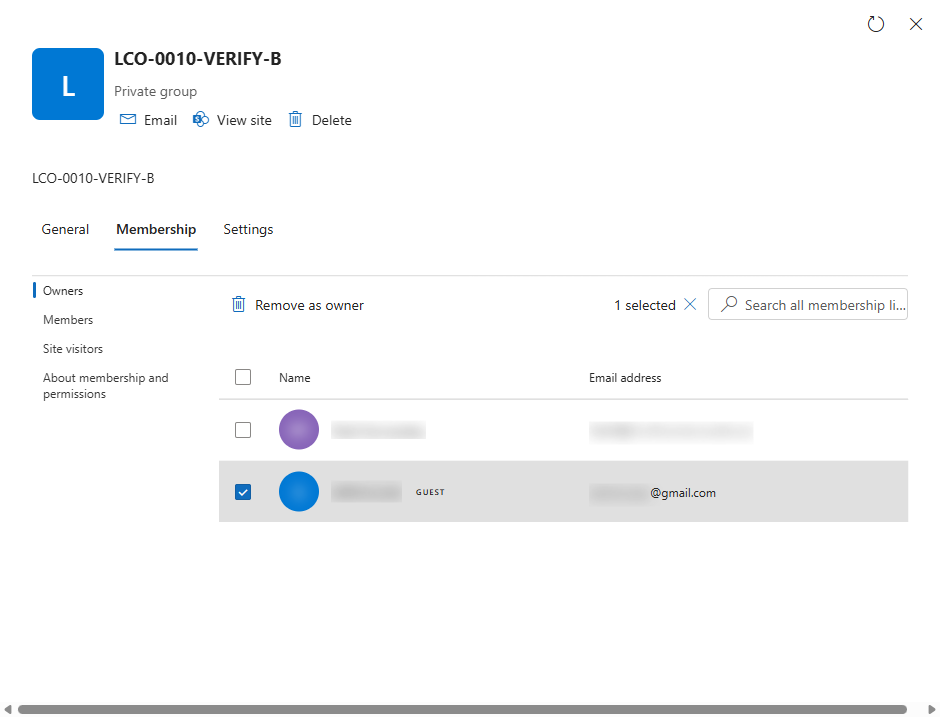
- Resist the shortcut of deleting the guest account. That doesn't demote one owner, it offboards the person from every workspace at once, with the side effects the next section covers.
What breaks when you demote the guest
The demotion itself is one click. What it removes is a working arrangement, and three things land on somebody's desk afterwards.
- The partner's self-service stops the same day. That guest owner has probably been adding and removing their own staff for months. Every one of those changes now routes through your internal owners instead. The partner's new starter who used to get access the same morning waits on your ticket queue, and the first person to notice is a project manager mid-sprint.
- Deleting the guest account creates the next finding. Account deletion skips the last-owner guard, so every other workspace where that guest was sole owner goes ownerless on the spot, which is LCO-0005 territory. The person also loses chat history, shared files, and meeting access across the tenant at once. From the partner's side, a tidy fix for one row reads as being locked out of the building mid-project.
- Demotion changes control, not access. As a member the guest still opens every file, reads every channel, and joins every meeting. If a data-exposure worry started this exercise, the owner list was the wrong lever, and the ticket closed as "fixed" is quietly still open. Membership and sharing reviews are their own conversation, and EXS-0001 covers one slice of it.
None of this argues against the fix. It argues for doing step 1 properly, so each demotion arrives with a named internal owner who knew it was coming.
Where this sits
LCO-0010, guest-owned workspaces, is one of the 123 policies in the Governance Autopilot catalog, which spans identity and access, guest and external sharing, workspace lifecycle and ownership, naming, and storage. Three sibling checks in this series watch the same boundary from other angles: workspaces with no owners at all (LCO-0005), guests who stayed on after guest access was switched off (EXS-0001), and guest accounts holding member-grade permissions (EXS-0017).
The script above checks one policy, once. That's the honest limit of a blog post. Governance Autopilot reads your whole tenant against all 123 in a single pass and gives you a report you can hand to your Head of IT (what it found, what each finding means, and what to do about it).
We're onboarding beta customers in small cohorts. Joining one gets you the full assessment, free while the beta runs. Apply for the beta.
References
- https://learn.microsoft.com/microsoftteams/guest-experience
- https://learn.microsoft.com/entra/fundamentals/users-default-permissions
- https://learn.microsoft.com/entra/external-id/user-properties
- https://learn.microsoft.com/microsoft-365/admin/create-groups/manage-guest-access-in-groups
- https://learn.microsoft.com/graph/api/group-list-owners
- https://learn.microsoft.com/graph/api/group-delete-owners
- https://learn.microsoft.com/entra/architecture/governance-deployment-guest-access