
Teams Governance

Microsoft Teams Management and Collaboration Apps

Microsoft Teams Management and Collaboration Apps

Why Microsoft Teams needs the right management tools

Microsoft Teams is the central hub for collaboration in Microsoft 365. But as usage grows, so do the challenges:

  • Hundreds of teams created without structure
  • External guests without control or review
  • Unclear ownership and missing lifecycle management
  • Files spread across multiple channels and sites

Without governance and structure, collaboration becomes chaotic and time-consuming. That’s where Teams management and collaboration apps come in — they bring order, automation, and transparency to Microsoft Teams.

Governance Apps – for structure and control

🧭 Teams Manager

Automate governance for Microsoft Teams with templates, approval workflows, and lifecycle management.

Key Features:

  • Templates for Teams and Microsoft 365 Groups
  • Request & approval workflows for new teams
  • Automated naming conventions and metadata
  • Lifecycle policies with automatic archiving and cleanup
  • Integration with sensitivity labels and classifications

💡 Best for IT admins who want consistent, compliant Teams creation and management with a high usability for endusers.

🛡️ External User Manager

Manage and secure guest access in Microsoft Teams. Keep control over who joins, for how long, and under what conditions.

Key Features:

  • Request and approval workflow for new guests
  • Onboarding and compliance portal
  • Automated lifecycles and guest removals
  • Access review reporting and audit trail
  • Integration with Microsoft Entra ID / Access Reviews

💡 Ideal for companies with external collaboration or compliance requirements.

Collaboration Apps – for productivity and focus

📁 File Manager

Bring a classic file explorer view to Teams. Navigate SharePoint libraries directly from Teams without losing context.

🚫 Blocker for SharePoint

Block access to specific SharePoint sites directly in Teams, except for whitelisted ones. Perfect for preventing data leaks and enforcing security policies.

📰 Intranet for Teams

Create a modern intranet experience directly inside Microsoft Teams — without switching platforms.

With the Intranet App, you can centralize company communication and give employees quick access to all important content in one place. Publish news, announcements, and internal updates directly in Teams and make them instantly visible to all employees.

You can integrate SharePoint content, add quick links, embed videos, or highlight key resources — all without leaving the Teams environment. This makes the Intranet app a perfect bridge between information management and daily collaboration.

🔗 Hyperlinks App

Simplify access to frequently used resources. Add, organize, and share links within your Teams environment.

💭 MindMap

Visualize ideas and brainstorm together directly inside Teams. Organize thoughts, structure projects, and share diagrams.

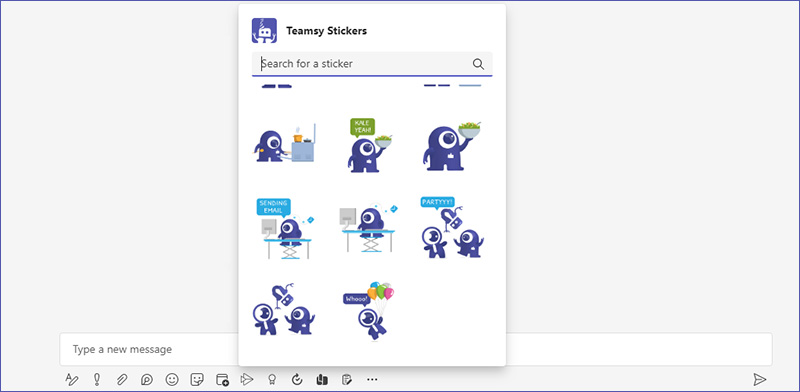
😄 Teamsy Stickers

Add personality and fun to your collaboration with custom Teams stickers and emojis.
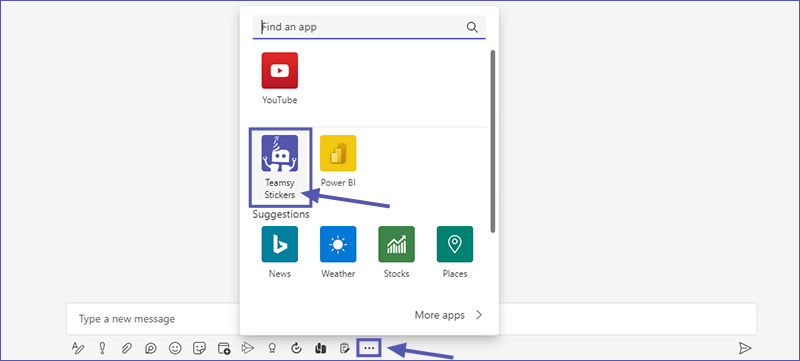
After the installation, find Teamsy Stickers in the messaging extensions.
Teamsy Stickers offers dozens of fun stickers for Microsoft Teams.

Governance vs. Collaboration – which do you need?

| Category | App | Main Use Case | Key Benefit |
| --- | --- | --- | --- |
| Governance | Teams Manager | Standardize and automate Teams lifecycle | Control and consistency |
|  | External User Manager | Manage and secure guest access | Secure external collaboration |
| Collaboration | File Manager | File navigation in Teams | Faster file access |
|  | Blocker for SharePoint | Restrict unwanted SharePoint links | Prevent data leaks |
|  | Intranet | News and content in Teams | Central information hub |
|  | Hyperlinks | Manage important links | Easy access to key resources |
|  | MindMap | Visual brainstorming | Better planning |
|  | Teamsy Stickers | Improve engagement | Fun and motivation |

Conclusion: From chaos to clarity in Microsoft Teams

The right tools turn Microsoft Teams into a structured, secure, and efficient workspace.

Governance apps like Teams Manager and External User Manager give IT full control. Collaboration apps boost productivity for every user.

👉 Book a free demo today and see how your organization can simplify Teams governance and collaboration.

FAQs about Teams management and collaboration apps

Do these apps integrate natively into Microsoft Teams?

Yes — all apps are built for Teams and available in the Microsoft AppSource.

Can I install multiple apps at once?

Yes, each app works independently but can be combined for full governance and collaboration.

Do the apps require admin permissions?

Governance apps like Teams Manager and External User Manager do. Collaboration apps typically don’t.

Is there a trial version?

Yes — all apps offer free trials or demo access.

Florian Pflanz
Written by
Christian Gross
CEO

Christian Groß is the founder and CEO of Solutions2Share and a recognized expert in Microsoft 365 and Microsoft Teams governance. With more than 10 years of experience building provisioning and governance software for Teams and Office 365, he has developed six Microsoft Teams applications, including Teams Manager, that help IT teams keep large Microsoft 365 environments structured and under control. He founded the German-speaking Microsoft 365 conference in Mainz and regularly speaks at international M365 events, where he helps IT leaders design scalable, practical governance strategies.

Connect on LinkedIn
Take the next step

Teams Manager

Microsoft Teams governance and management. Prevent uncontrolled team sprawl with templates, approval workflows, and lifecycle management.

Book a free demo